The MSP's Guide to Profitable SaaS Backup: Building Recurring Revenue with Keepit
If you run an MSP in Australia or New Zealand, you already know the conversation. A customer's Microsoft 365 tenant gets compromised, an admin deletes the wrong SharePoint site, or someone offboards a sales rep and loses six months of Salesforce activity. Then comes the awkward question: "You're backing this up, right?"
Microsoft, Google, and Salesforce all operate under a shared responsibility model. They protect the platform. You protect the data. Most end customers still don't understand this, which is exactly why SaaS backup remains one of the cleanest recurring revenue opportunities in the channel.
The problem is that selling it profitably is harder than it looks. Margins get eaten by storage overages, billing reconciliation chews up admin hours, and tier-one support tickets pile up when restore tools are clunky. This guide is about fixing those three problems specifically, using Keepit as the platform and the tools we've built around it for ANZ partners.
Why SaaS backup, and why now
The ANZ market has caught up fast. Essential Eight maturity expectations, the Privacy Act reforms, APRA CPS 234 for financial services, and the growing weight of cyber insurance questionnaires have all pushed SaaS backup from "nice to have" to a line item auditors actually check. Pacific National, City of Parramatta Council, and ANCA have all gone public about why they moved off Microsoft's native retention to dedicated backup. Their customers and regulators were asking harder questions.
For MSPs, that means the sales conversation is shorter. You're no longer educating the customer that they need backup. You're explaining why your platform is the right one.
Picking a platform that doesn't kill your margin
A lot of MSPs got burned in the early days of cloud backup by per-GB pricing models. Customer data grows, your bill grows, and the fixed price you quoted twelve months ago suddenly looks tight. Keepit's pricing avoids that trap in a way that matters for partners:
- Per-user pricing with unlimited retention and unlimited storage included
- No egress fees, no rehydration charges, no ingress charges
- A Sydney data centre, so data sovereignty is handled without extra contracts
That last point is bigger than it sounds. We've seen partners lose government and healthcare deals because their backup vendor stored data offshore or routed restores through a US region. Sydney-resident, ISO 27001 certified, with ISAE 3402 and GDPR alignment ticks the boxes that procurement teams are now asking about up front.
The other thing worth calling out is where Keepit's cloud actually lives. It's not on Azure, AWS, or GCP. It's Keepit's own infrastructure, billed separately, operated separately. If your customer's Microsoft tenant is compromised or their Azure subscription gets suspended in the middle of an incident, the backup copies are genuinely outside the blast radius. That's a real selling point against competitors who back up Microsoft 365 to Azure.
The 15-workload story changes the maths
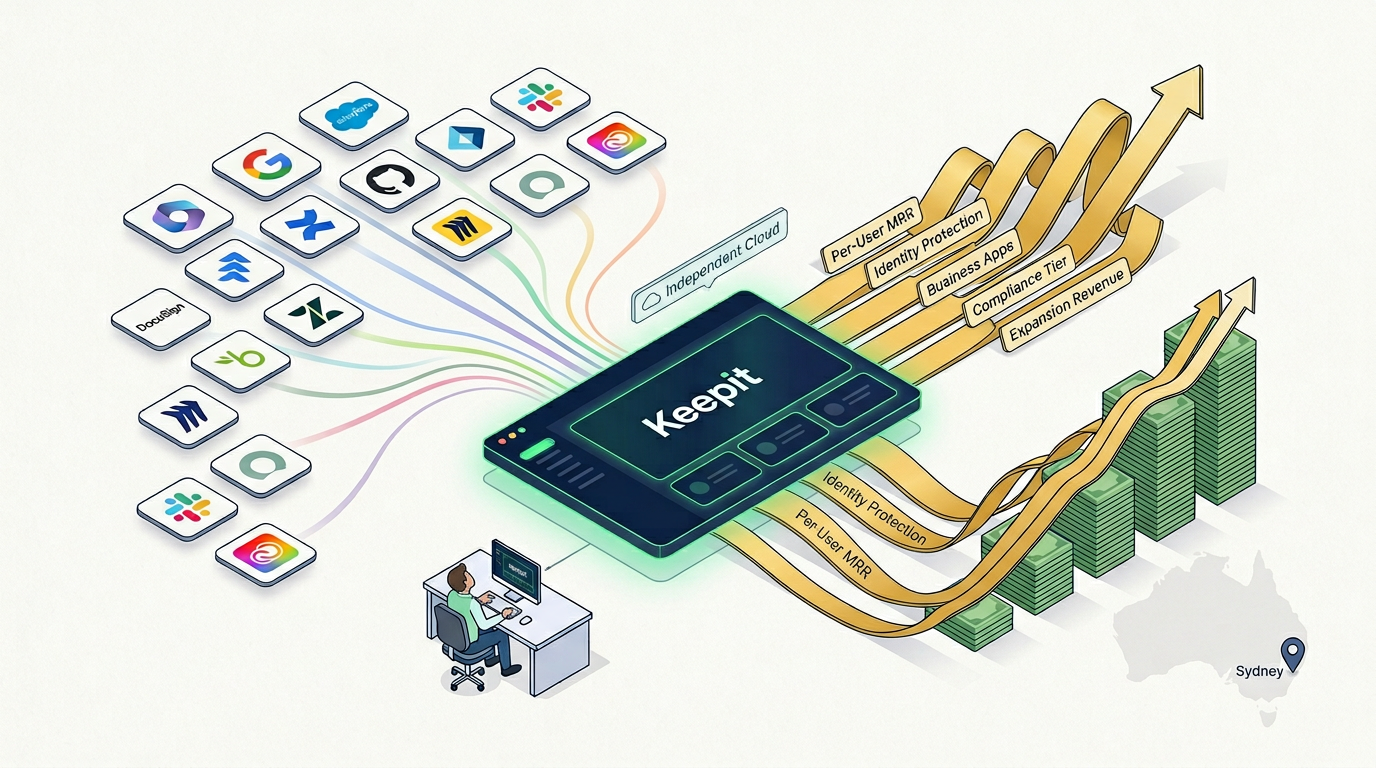
Most SaaS backup vendors started with Microsoft 365 and stopped there. Keepit currently protects 15 workloads and ships a new connector every four to six weeks. The list runs across M365, Entra ID, Dynamics 365, Power Platform, Azure DevOps, Google Workspace, Salesforce, Jira, Confluence, Zendesk, Okta, DocuSign, BambooHR, Miro, and GitHub.
For an MSP, this is where the recurring revenue compounds. A customer you signed up for M365 backup eighteen months ago is almost certainly using Salesforce, Jira, or DocuSign by now. Each of those is a new line item billed through the same console, on the same per-seat model, with no new product to deploy or train your engineers on. You're not chasing new logos to grow ARR. You're growing existing accounts.
We've seen partners go from $8 per seat to over $20 per seat on the same customer base by progressively adding workloads as the customer adopted them.
The billing problem nobody talks about
Here's where most MSP practices quietly leak profit. You sell licences in arrears, the customer adds 30 users mid-month, your distributor invoice doesn't reconcile cleanly with what you've billed the customer, and someone on your team spends a day every month working out who owes what.
This is the gap we built kcm.cloudreadysolutions.com.au to close. The Keepit Cloud Manager portal gives CRS partners direct visibility into:
- Live licence counts per customer tenant, updated in real time
- Monthly usage so you can reconcile against your own billing
- Provisioning and deprovisioning without raising tickets
- Invoice and statement history in one place
The practical effect is that your finance team stops chasing CSV exports and your engineers stop emailing distribution to add 5 seats for a customer who onboarded yesterday. You see what you're being billed for, you see what you should be billing the customer for, and the numbers match.
For partners running 50 or more tenants, that's hours back every month. For partners running hundreds, it's the difference between needing a dedicated billing analyst and not.
Operational reality: the Partner Management Console
Keepit's own Partner Management Console handles the day-to-day operational layer. Single pane across all your customer tenants, the ability to sign into a customer environment with your own credentials for troubleshooting, a provisioning wizard that standardises new account setup, and exportable seat usage reports.
Paired with the CRS billing portal, you've got operational visibility on one side and commercial visibility on the other. That separation matters. Your engineers don't need to see invoices. Your accounts team doesn't need to see restore jobs.
What to charge, and how to package it
A simple structure that works in the ANZ market:
Essentials tier: M365 backup only, sold as a flat per-seat add-on to existing managed services. Low-friction upsell, usually accepted without much negotiation.
Business tier: M365 plus Entra ID plus one business app (Salesforce, Jira, or Dynamics depending on the customer). Priced at a meaningful step up because identity backup is the piece that saves you during a real incident.
Compliance tier: Full coverage across whatever SaaS the customer runs, plus quarterly restore testing as a service, plus a written compliance attestation you can hand to their auditor. This is where the margin lives, and it's the tier that wins Essential Eight conversations.
Don't undersell the compliance tier. Customers facing CPS 234, Essential Eight Maturity Level 2, or NIS2 (for ANZ subsidiaries of European parents) are buying paperwork as much as they're buying backup. Charge accordingly.
Where Keepit stops, and what to pair it with
One thing to be straight with customers about: Keepit is pure SaaS backup. It does not cover endpoints, physical servers, VMs, or on-premises file shares. If you're building a complete data protection practice, you'll pair Keepit with NAKIVO for VM and physical workload backup, Cibecs for endpoint backup, and StoneFly for immutable on-prem or DR storage targets. We distribute all four, which means a single conversation with us covers the whole stack.
Getting started
If you're already a CRS partner, the Keepit Cloud Manager portal is live at kcm.cloudreadysolutions.com.au and we can have your first tenant provisioned the same day. If you're not, get in touch and we'll walk you through partner onboarding, NFR licences for your own internal use, and the deal registration process.
SaaS backup isn't going to win you headlines, but it will quietly add predictable monthly revenue to your P&L for as long as your customers use cloud applications. Which is to say, for as long as you're in business.