Cloud Ready Solutions no longer distributes Arcserve
This article is kept for reference. For backup and disaster recovery today we recommend NAKIVO for virtual and physical workloads, Keepit for SaaS data, and StoneFly appliances with Veeam. Talk to us about backup & DR or get in touch.
Last week, CrowdStrike, a leading provider of cybersecurity solutions, experienced a global outage that affected numerous organization. Causing disruptions across multiple services and leaving users worldwide facing the notorious 'Blue Screen of Death' (BSOD).
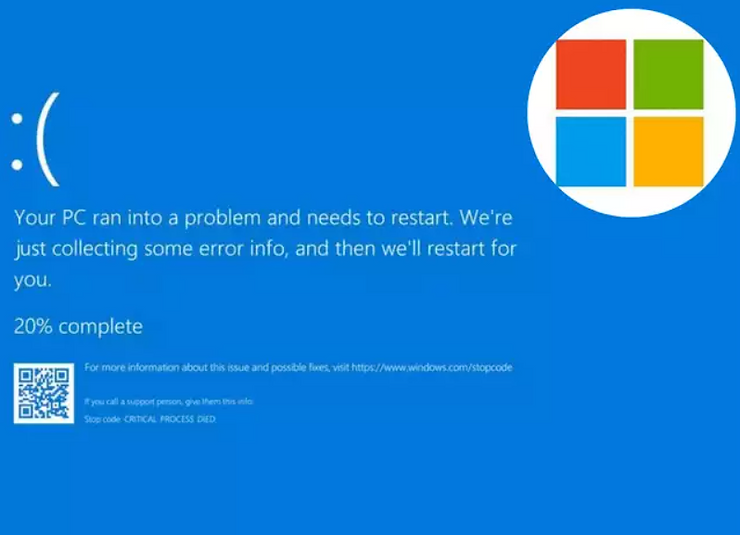
This widespread outage is cause by CrowdStrike' s update that clashed with Microsoft’s Windows operating system, causing widespread device failures. Given that nearly every large organization worldwide relies on Microsoft Windows, the impact was significant.
Access to backups of Bitlocker Keys saved companies time recovering from Crowdstrike issue!
During the IT massive tech failure many IT administor don't have access to their Bitlocker keys cause more delay on the recovery process. The delay could be preventable if you have a accessible SaaS Back up. With Arcserve SaaS with Entra ID Protection helps organisations ensures business continuity and compliance through unlimited storage and retention. With features like point-in-time backup and granular restore capabilities.
Which also stores your BitLocker recovery key backup that IT admins need to access to a swifter method for rebooting machines after a problematic IT outage that may occur.
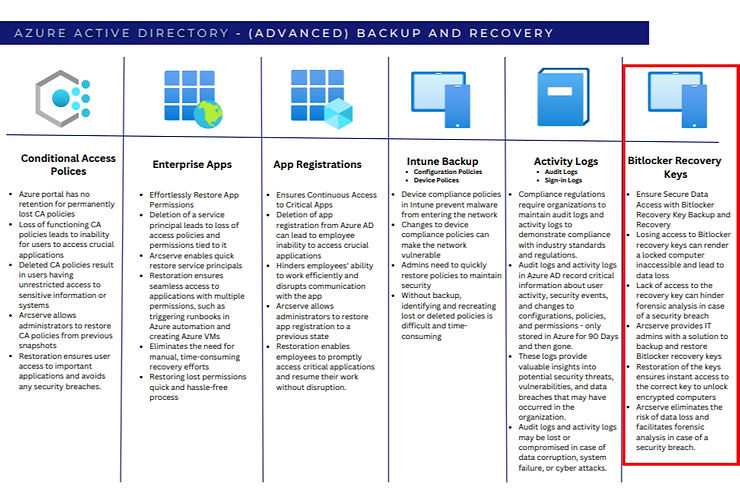
Below are Key feutures of Arcserve SaaS backup and recovery for Entra ID (formerly known as Azure AD):
To know more about Entra ID Back up and Recovery Download this: 👇👇👇
Securing the Gateway - The Indispensable Need to Safeguard Entra ID in Modern Organization.
What Went Wrong: The CrowdStrike Update in Detail
On 19 July 2024, CrowdStrike pushed a content configuration update to its Falcon Sensor agent running on Windows endpoints. The update contained a logic error in a channel file (Channel File 291) that caused the sensor's kernel-level driver to trigger a null pointer exception during boot. Because the Falcon Sensor operates as a kernel driver — loading before most other Windows services — the failure occurred early in the boot process, producing an unrecoverable BSOD before the operating system could fully start.
The fix required manual intervention on every affected machine: booting into Safe Mode or the Windows Recovery Environment, navigating to the CrowdStrike driver directory, and deleting the offending channel file. On machines with BitLocker enabled, this process could not even begin without first entering the 48-character BitLocker recovery key. For organisations with hundreds or thousands of encrypted endpoints, this turned a software bug into a logistics nightmare.
Why BitLocker Recovery Keys Are the Bottleneck
BitLocker drive encryption is enabled by default on many enterprise Windows deployments, particularly those managed through Microsoft Intune or Group Policy. When a machine enters Safe Mode or the Recovery Environment, Windows prompts for the BitLocker recovery key before granting access to the encrypted system drive. Without that key, the administrator cannot reach the file system to delete the faulty CrowdStrike driver file.
In a normal hardware failure scenario, IT teams retrieve BitLocker keys from Active Directory or Entra ID (formerly Azure AD). But during the CrowdStrike incident, many organisations discovered that their Entra ID access was itself disrupted, or that recovery keys had not been consistently backed up. This is where having an independent SaaS backup of your Entra ID directory — including device recovery keys — proved to be the difference between a four-hour recovery and a four-day recovery.
How Arcserve SaaS Backup Shortens Recovery Time
Arcserve SaaS with Entra ID Protection maintains a complete, independent copy of your Entra ID tenant data, including user accounts, group memberships, conditional access policies, and — critically — BitLocker recovery keys. Because this backup is stored outside of Microsoft's infrastructure, it remains accessible even when your primary Entra ID tenant is experiencing issues or when your IT team is locked out during a major incident.
Key capabilities that matter during an outage like CrowdStrike:
- Point-in-time restore — Roll back to a known-good state of your directory, or retrieve specific objects like BitLocker keys without restoring the entire tenant.
- Granular object search — Search across backed-up Entra ID objects to quickly locate the recovery key for a specific device by its device name or ID.
- Unlimited retention — No expiry on backed-up data, so recovery keys remain available even for older devices that may not have synced recently.
- Independent infrastructure — Arcserve SaaS operates on its own cloud platform, not dependent on Azure availability.
Building a Resilient Recovery Plan
The CrowdStrike incident exposed a gap in many organisations' disaster recovery planning: the assumption that identity infrastructure will always be available when you need it. A practical recovery plan should include these steps:
- Back up Entra ID independently — Use Arcserve SaaS Backup to maintain an off-platform copy of your directory, including BitLocker keys and conditional access policies.
- Test recovery key retrieval — Run quarterly drills where your IT team retrieves a BitLocker key from the backup and uses it to unlock a test device.
- Maintain a local recovery key cache — For your most critical machines, keep an encrypted offline copy of BitLocker keys in a secure physical location.
- Document the Safe Mode recovery process — Ensure your helpdesk team has step-by-step instructions for booting into WinRE and deleting driver files, so they are not improvising during an incident.
Conclusion
The CrowdStrike outage was a reminder that even trusted security software can become the source of a major disruption. Organisations that had independent backups of their Entra ID data — including BitLocker recovery keys — were able to begin remediation immediately, while others spent days manually tracking down keys or re-imaging machines from scratch. Protecting your identity infrastructure with a dedicated SaaS backup is not just a compliance checkbox — it is a practical measure that directly reduces your recovery time when the unexpected happens.
Why Partner with Cloud Ready Solutions:
At Cloud Ready Solutions, we're your dedicated partner in success, offering customized solutions and local market expertise. Since 2014, our in-depth knowledge and experience as an Arcserve distributor set us apart. We provide presales support, expert consultancy, and detailed training to ensure you get the most from Arcserve solutions to protect your business. Join us in safeguarding what's priceless. Contact us today to learn how we can work together.